#
Getting Started with Verify REST API
#
1. Overview
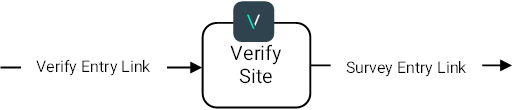
This guide presents the requirements for integrating the Realeyes Verify service to direct users through the Verify Entry Link, into the VerifySite for facial verification and quality checks, and onto the Survey Entry Link.
The following diagram illustrates the redirect chain:
#
2. Service Authentication
Realeyes provides an account hash and an API key to authenticate API requests.
You can get your credentials by logging into the Developers Portal, if you don't have an account, you can sign up there.
#
3. Available Regional Services
Our service runs in three regions (Europe, USA and Singapore) to meet the highest levels of security, compliance, and data protection.
You will need to call the corresponding regional endpoints (EU, US, SG) to successfully manage a project or audit the verifications.
#
4. Creating Your First Project
In this API context, a "project" refers to the container that encapsulates all parameters, authentication details, and other relevant information needed to interact with the service and generate the desired redirect URL.
Projects allow for better organization and management of different service configurations within the API ecosystem.
Your first project will consist on configuring Verify in monitoring mode. This means that Verify will monitor every respondent without taking any action. After the respondent is finished with the facial verification, the Verify service will redirect them back. The recorded respondent status will be monitored continuously and can be tracked on the provided dashboard.
If you have any questions or need dashboard access, please write to support@realeyes.ai
The API endpoints are segmented by region as follows:
- EU: https://verify-api-eu.realeyesit.com/index.html
- US: https://verify-api-us.realeyesit.com/index.html
- SG: https://verify-api-sg.realeyesit.com/index.html
The request method is POST /api/v1/redirect/create-project
An API reference for this functionality is also available via the API Reference page.
#
Request Parameters
The API requires additional information to process requests.
Authorization header:
X-Api-Key: Your Account API Key (available in the Developers Portal)
Request Body:
{
 "projectName": "string",
 "targetUrl": "string",
 "customVariables": "string"
}
Here's a breakdown of the request:
- projectName: A descriptive name for your project. For each face detected, we extract facial features and store the feature information in a database which we call after the project name. Verify searches new faces against all faces in the specified project to detect duplicate or fraudulent attempts.
- targetUrl: Enter the URL where all users should be directed, regardless of giving consent or passing verification.
- customVariables: Our platform can pass through any variable in the entry link. Include here all the extra parameters you need.
#
Response Format
The response is the created project:
{
 "projectId": "string",
 "projectSlug": "string",
 "projectUrls": [
 {
 "languageCode": "string",
 "url": "string"
 }
 ],
 "errorMessage": "string"
}
The API response contains the projectUrls property, which holds the language-specific URLs of the created project.
The available languageCode values are: en, es, fr, de, it, zh-hant, zh-hans.
The returned url is in the following format:
https://verify-{region}.realeyesit.com/project/{accountHash}/{projectSlug}?lang={languageCode}&...
#
Code Examples
import requests
import json

url = "https://verify-api-eu.realeyesit.com/api/v1/redirect/create-project"
api_key = "YOUR API KEY"

headers = {
 "X-Api-Key": api_key,
 "Content-Type": "application/json",
}

request = {
 "projectName": "test project",
 "targetUrl": "https://example.com",
 "customVariables": None,
}

response = requests.post(url, headers=headers, data=json.dumps(request))

if response.status_code == 200:
 print(response.json())
else:
 print(response.status_code, response.text)
var url = "https://verify-api-eu.realeyesit.com/api/v1/redirect/create-project";
var apiKey = "YOUR API KEY";
var request = new
{
projectName = "test project",
targetUrl = "https://example.com",
customVariables = (string)null,
};
var client = new HttpClient();
client.DefaultRequestHeaders.Add("X-Api-Key", apiKey);
client.DefaultRequestHeaders.Accept.Add(new MediaTypeWithQualityHeaderValue("application/json"));
var response = await client.PostAsJsonAsync(url, request);
var responseContent = await response.Content.ReadAsStringAsync();
Console.WriteLine($"{response.StatusCode} - {responseContent}");Regional Service
The API is a regional service, you need to send requests to the correct endpoint. The above examples are using the European endpoint.
You need to consistently use the same endpoint for all requests, otherwise you will get an error.
#
5. Next Steps
For the full list of available endpoints and their parameters, please refer to the API Reference page.
Explore the how-to guides:
- Redirect User to Target
- Pass Custom Variables
- Match Verifications and Identifiers
- Confirm User Profile
- Choose Language
- Encrypted Invite Link
- Audit Verifications
- Interpret Results
- Incoming URL Signing
- URL Signing Algorithm
#
Support
Need help? Contact us: