#
Verify REST API - Panel Quality Verification
REST API for panel quality verification and fraud detection. Direct users through facial verification and quality checks before redirecting to your survey or target URL.
#
Overview
The Verify REST API provides a comprehensive solution for panel quality verification. Users are directed through the Verify Entry Link, complete facial verification and quality checks on the VerifySite, and are then redirected to your Survey Entry Link with verification results.
#
The Redirect Chain
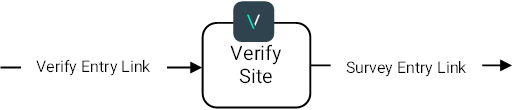
The verification flow consists of three main steps:
- Entry Link - User clicks your Verify entry link
- VerifySite - User completes facial verification and quality checks
- Target Link - User is redirected to your survey or target URL with verification status
#
Key Features
- Duplicate Detection - Identify users who have already been verified
- Fraud Prevention - Detect and block fraudulent verification attempts
- Quality Checks - Ensure high-quality verification data
- Demographic Verification - Confirm age and gender with Vision AI
- Multi-Language Support - 25+ languages supported
- Regional Services - EU, US, and SG endpoints for compliance
- Secure - URL signing and encrypted invite links
- Flexible - Monitoring or qualifying modes
#
How It Works
#
Monitoring Mode
All users pass through verification regardless of status. Perfect for:
- Testing and evaluation
- Collecting data without blocking users
- Monitoring fraud patterns
#
Qualifying Mode
Only verified users proceed to the target URL. Failed users are redirected to a termination URL. Ideal for:
- Ensuring panel quality
- Blocking duplicate or fraudulent users
- Enforcing demographic requirements
#
Quick Start
#
1. Get Your API Key
Sign up and get your API key from the Developers Portal.
#
2. Create a Project
Use the REST API to create a verification project:
import requests
import json

url = "https://verify-api-eu.realeyesit.com/api/v1/redirect/create-project"
api_key = "YOUR API KEY"

headers = {
 "X-Api-Key": api_key,
 "Content-Type": "application/json",
}

request = {
 "projectName": "My Survey Project",
 "targetUrl": "https://example.com/survey",
 "customVariables": "userId,sessionId",
}

response = requests.post(url, headers=headers, data=json.dumps(request))

if response.status_code == 200:
 project = response.json()
 print(f"Entry URL: {project['projectUrls'][0]['url']}")
else:
 print(response.status_code, response.text)
var url = "https://verify-api-eu.realeyesit.com/api/v1/redirect/create-project";
var apiKey = "YOUR API KEY";
var request = new
{
projectName = "My Survey Project",
targetUrl = "https://example.com/survey",
customVariables = "userId,sessionId",
};
var client = new HttpClient();
client.DefaultRequestHeaders.Add("X-Api-Key", apiKey);
var response = await client.PostAsJsonAsync(url, request);
var project = await response.Content.ReadFromJsonAsync<Project>();
Console.WriteLine($"Entry URL: {project.ProjectUrls[0].Url}");
#
3. Direct Users to Verify
Send users to the entry URL with your custom parameters:
https://verify-eu.realeyesit.com/project/{projectSlug}?userId=user123&sessionId=abc456
#
4. Handle the Redirect
Users will be redirected back to your target URL with verification results:
https://example.com/survey?userId=user123&sessionId=abc456&verificationStatus=OK&re-age=25-34&re-gender=Female
#
Verification Results
#
Status Values
#
Additional Parameters
re-age- Detected age range (e.g., "25-34")re-gender- Detected gender (Male or Female)re-verification-session-id- Unique verification session IDre-matching-verification-session-id- Original session ID (for duplicates)re-matching-user-id- Original user ID (for duplicates)
#
Regional Services
Choose the endpoint closest to your users for optimal performance and compliance:
- EU: https://verify-api-eu.realeyesit.com/
- US: https://verify-api-us.realeyesit.com/
- SG: https://verify-api-sg.realeyesit.com/
Regional Consistency
Always use the same regional endpoint for all operations (create project, sign URLs, audit verifications). Mixing endpoints will result in errors.
#
Documentation
#
Getting Started
Learn how to create your first project and integrate the API.
#
API Reference
Complete API documentation for all regional endpoints.
#
How-To Guides
Step-by-step guides for common tasks:
- Redirect users to target
- Pass custom variables
- Match verifications and identifiers
- Confirm user profile
- Choose language
- Generate encrypted invite links
- Audit verifications
- Interpret results
- Sign URLs for security
#
Security Features
#
URL Signing
Sign URLs to prevent tampering:
# Create signed URL
response = requests.post(
 "https://verify-api-eu.realeyesit.com/api/v1/redirect/create-signature",
 headers={"X-Api-Key": api_key},
 json={"queryString": "?userId=user123&age=25"}
)

signed_url = response.json()["signedQueryString"]
#
Encrypted Invite Links
Hide sensitive parameters from users:
# Generate encrypted invite link
response = requests.post(
 "https://verify-api-eu.realeyesit.com/api/v1/redirect/generate-invite-link",
 headers={"X-Api-Key": api_key},
 json={
 "projectSlug": "my-project",
 "queryString": "?userId=user123&targetUrl=https://example.com/survey"
 }
)

invite_link = response.json()["inviteLink"]
#
Signature Validation
Validate signatures to ensure authenticity:
# Validate signature
response = requests.post(
 "https://verify-api-eu.realeyesit.com/api/v1/redirect/validate-signature",
 headers={"X-Api-Key": api_key},
 json={"queryString": full_query_string}
)

is_valid = response.json()["isValid"]
#
Support
Need help? We're here for you:
- Email: support@realeyes.ai
- Documentation: Browse the guides above
- API Keys: Developers Portal
- Contact: Contact Us
Last updated: 2025-01-13